
Controlled & Uncontrolled Components
Most components in our library are controlled, with the exception of Textfield and Textarea.
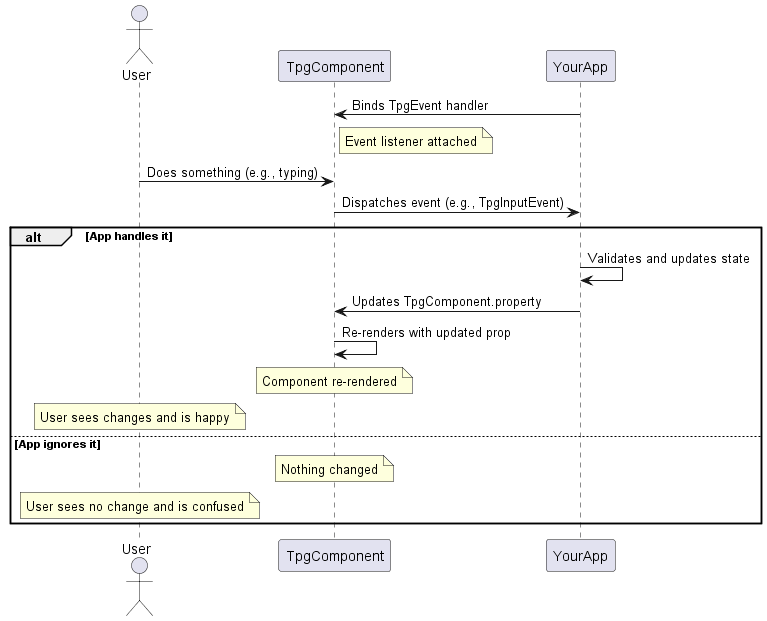
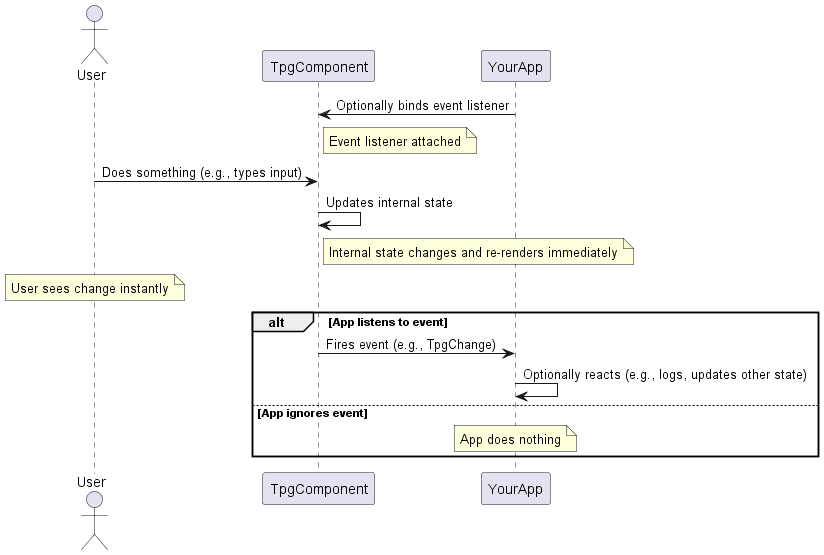
Controlled & Uncontrolled flow charts
Controlled Component
Uncontrolled Component
| Feature | Controlled Component | Uncontrolled Component |
|---|---|---|
| State Management | Your app manages the component’s state | The DOM manages the componenet’s state |
| Data validation | Easy to validate on each event | Harder to keep track of changes |
Controlled Components
With & Without event handler
The Switch is a controlled component. When a user clicks it,
the component emits a TpgChangeEvent, but it doesn’t manage
its own state. It’s up to your application to listen to that
event and explicitly update the checked value to reflect the
new state.
- Without an event handler and state update logic, the switch won’t visually toggle—it depends entirely on your code to control its behavior.
  <tpg-switch class="controlled" label="I have an event handler (click me)"></tpg-switch>
  <tpg-switch label="I don't have an event handler (click me)"></tpg-switch>
<script> document.addEventListener('DOMContentLoaded', ()=>{ const switches = document.querySelectorAll('tpg-switch.controlled'); for (const s of switches) { s.addEventListener("tpg-change", (e) => { e.target.selected = e.value; }); } }); </script> <tpg-switch label="I have an event handler (click me)" ontpg-change={(e) => ((e.target as Switch).selected = e.value!)} ></tpg-switch>
<tpg-switch label="I don't have an event handler (click me)" ></tpg-switch>Uncontrolled Components
With & Without event handler
The Textfield in this case is an uncontrolled component. When the user types into the field, it updates immediately based on the browser’s default behavior. The component manages its own internal state, and no additional logic is required to handle the input.
- You can still listen to events (like
TpgInputEventorTpgChangeEvent) if you need to react to user input, but you’re not responsible for managing the input’s state.
<tpg-text-field clear-button label="I don't have an event listener attached to me"></tpg-text-field> <tpg-text-field clearButton label="I don't have an event listener attached to me"></tpg-text-field>